1、报错信息
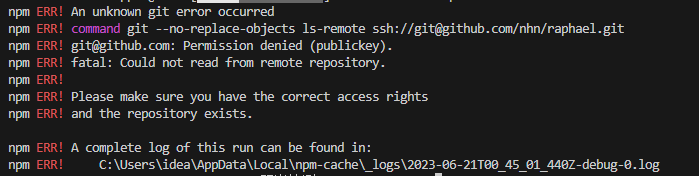
npm ERR! code 128
npm ERR! An unknown git error occurred
npm ERR! command git --no-replace-objects ls-remote ssh://git@github.com/layouts/Admin.js.git
npm ERR! git@github.com: Permission denied (publickey).
npm ERR! fatal: Could not read from remote repository.
npm ERR!
npm ERR! Please make sure you have the correct access rights
npm ERR! and the repository exists.
npm ERR! A complete log of this run can be found in:
npm ERR! C:\Users\xxx\AppData\Local\npm-cache_logs\2022-05-30T05_33_24_378Z-debug-0.log
2、解决办法
运行以下命令
git config --global http.sslverify "false"
然后再执行
npm install
如果上述命令执行完后,还是报那个错误,继续执行如下命令
git config --global url."https://".insteadOf git://
可以通过如下操作解决 npm 下载速度慢的问题
npm i
nstall --registry=https://registry.npm.taobao.org
Error: EPERM: operation not permitted问题
删除C:\Users\用户名.npmrc 文件就ok