1. 每行表格之间有间距
    .el-table__body {
        border-spacing: 0px 6px !important; // 这行代码为间隔效果!!!
    }
2. 表格文字太长,隐藏多余文字,移入显示tips
<el-table-column prop="info" label="介绍" align="center" :show-overflow-tooltip="true"></el-table-column>
3. 表格show-overflow-tooltip属性 设置tips的样式 注意: 在style标签中不要加scoped
    .el-tooltip__popper,.el-tooltip__popper.isdark {
        max-width: 6rem;
        padding: 0.2rem !important;
        background: rgba(6, 34, 69, 0.95) !important;
        box-shadow: 0px 0px 0.1rem #0575ff !important;
        font-size: 0.4rem !important;
        font-family: ZiTiQuanXinYiGuanHeiTi!important;
    }
4. 每行表格鼠标移入去掉了背景色
 /deep/.el-table tbody tr:hover>td {
      background-color: transparent !important;
  }
  /deep/.el-table td.el-table__cell,
  /deep/.el-table th.el-table__cell.is-leaf  {
      background-color: transparent !important;
  }
  /deep/.el-table__fixed-right tbody tr:hover>td {
      background-color: transparent !important;
  }
5. 给表格设置边框
<el-table data="" height="100%" style="width: 100%;" :cell-class-name="tableCellClassName"></el-table>

js
  tableCellClassName({ row, column, rowIndex, columnIndex }) {
      if (columnIndex == 0) {
        return 'cell-start'
      } else {
        return 'cell-middle'
      }
   },

css
  	/deep/.cell-start {
      border-top: 1px solid rgb(255, 255, 255)!important;
      border-bottom: 1px solid rgb(255, 255, 255) !important;
      border-left: 1px solid rgb(255, 255, 255)!important;
    }
    /deep/.cell-end {
      border-top: 1px solid rgb(255, 255, 255)!important;
      border-bottom: 1px solid rgb(255, 255, 255) !important;
      border-right: 1px solid rgb(255, 255, 255)!important;
    }
    /deep/.cell-middle {
      border-top: 1px solid rgb(255, 255, 255)!important;
      border-bottom: 1px solid rgb(255, 255, 255) !important;
      &:last-child{
        border-right: 1px solid rgb(255, 255, 255)!important;
      }
    }
6. 列固定,鼠标移入去掉高亮
    ::v-deep  .el-table .el-table__body tr.hover-row > td{
    background-color: #06254B!important;
    }
    ::v-deep  .el-tablle--enable-row-hover .el-table__body tr:hover > td{
    background-color: #06254B!important;
    }
    /deep/ .el-table__fixed {
    height: 100% !important; //设置高优先,以覆盖内联样式
    }
    /deep/ .el-table__fixed-right {
    height: 100% !important; //设置高优先,以覆盖内联样式
    }
7. 去掉表格默认背景颜色
/*最外层透明*/
::v-deep .el-table,
::v-deep .el-table__expanded-cell {
	background-color: transparent !important;
}
/* 表格内背景颜色 */
::v-deep .el-table th,
::v-deep .el-table tr{
	 background-color: transparent;
	 border: 0; //去除表格
	 color: #fff;
}
::v-deep .el-table td {
	background-color: transparent;
	color: #fff;
}
/*去除底边框*/
::v-deep.el-table td.el-table__cell {
	border: 0;
}
::v-deep.el-table th.el-table__cell.is-leaf {
	border: 0;
}
/*去除底部灰条.el-table::before*/
::v-deep .el-table::before{
  background-color: transparent;
}
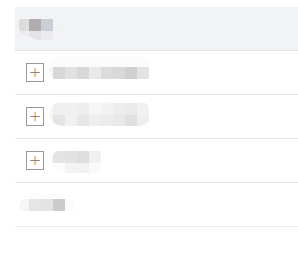
8. 自定义表格展开和收起图标
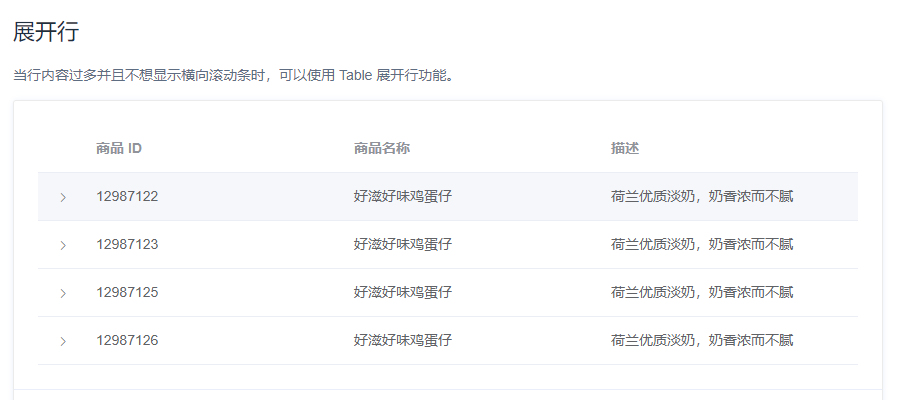
// 修改展开按钮样式
    ::v-deep.el-table__expand-icon{
        -webkit-transform: rotate(0deg);
        transform: rotate(0deg);
        margin-right: 8px;
        // 展开按钮未点击的样式是加号带边框
        .el-icon-arrow-right::before{
            content: '\e6d9';
            border: 1px solid #999999;
            padding: 2px;
        }
    }
    // 展开按钮点击后的样式是减号带边框
    ::v-deep.el-table__expand-icon--expanded .el-icon-arrow-right::before{
        content: "\e6d8";
        color: #165DFF;
        border: 1px solid #165DFF;
    }
效果如下
9. table表头全部或单个表头颜色header-row-style
设置全部表头颜色白色#ffffff,字体黑色#000000,
方式一,(推荐)
  <el-table
:data="tableList" style="width: 100%"
:header-cell-style="{
      background:'#FFFFFF',color:'#000000'}">
 </el-table>
方式二 :header-cell-style="tableHeaderColor"
 <el-table v-loading="listLoading"
    style="width: 100%"
    :data="list"
    @sort-change="changeSort"
    :header-cell-style="tableHeaderColor">
</el-table>
methods: {
    tableHeaderColor ({row, column, rowIndex, columnIndex}) {
          return 'background-color: #ffffff;color:#000000;'
      },
}

设置某一个表头颜色
 <el-table v-loading="listLoading"
    style="width: 100%"
    :data="list"
    @sort-change="changeSort"
    :header-cell-style="tableHeaderColor">
</el-table>
//设置表头的颜色
 tableHeaderColor({ row, column, rowIndex, columnIndex }) {
      console.log(row, column, rowIndex, columnIndex);
      if (rowIndex === 0 && columnIndex === 1) {
        return 'background-color: #afccfd;color:#000000;'; //蓝色
      } else if (rowIndex === 0 && columnIndex === 2) {
        return 'background-color: #c0e33c;color:#000000;';//绿色
      } else if (rowIndex === 0 && columnIndex === 3) {
        return 'background-color: #fbc57b;color:#000000;';//橙色
      } else {
        return 'color:#000000;background: #ffffff;';
      }
},

10. 表格加载中
<el-table
    :data="tableData"
    style="width: 100%"
    :header-cell-style="{background:'#F2F3F5',color:'#1D2129'}"
    v-loading = "isLoading"
    element-loading-text = "加载中,请稍后..."
    element-loading-background = "rgba(255, 255, 255, .5)"
    element-loading-spinner = "el-icon-loading"
></el-table>
11. 表格文字超出隐藏文字显示...,鼠标移入显示全部文字内容并设置弹出内容的宽度。
<style>
    .el-tooltip__popper{
        max-width:20%
    }
</style>