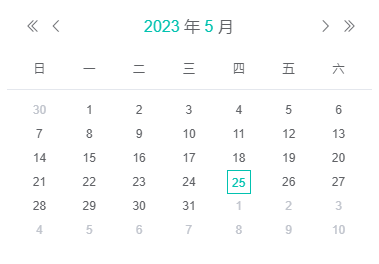
子组件
<template>
  <div class="cal_con">
    <div class="cal_header">
      <div class="cal_h_left">
		<!-- 上一年按钮 -->
        <div class="cal_h_btn" @click="preYear">
			<svg-icon icon-class="el-icon-d-arrow-left" class-name="cal_h_l_icon"></svg-icon>
        </div>
		<!-- 上个月按钮 -->
        <div class="cal_h_btn" @click="preMonth">
			<svg-icon icon-class="el-icon-arrow-left" class-name="cal_h_l_icon"></svg-icon>
        </div>
      </div>

      <div>
        <span class="cal_h_time"><span class="cal_h_time_text">{{ year }}</span> 年 </span>
        <span class="cal_h_time"><span class="cal_h_time_text">{{ month }}</span> 月</span>
      </div>

      <div class="cal_h_left">
		  <!-- 下个月按钮 -->
        <div class="cal_h_btn" @click="nextMonth">
			<svg-icon icon-class="el-icon-arrow-right" class-name="cal_h_l_icon"></svg-icon>
        </div>
		<!-- 下一年按钮 -->
        <div class="cal_h_btn" @click="nextYear">
			<svg-icon icon-class="el-icon-d-arrow-right" class-name="cal_h_l_icon"></svg-icon>
        </div>
      </div>
    </div>

    <div class="cal_month">
	  <!-- 星期 -->
      <div class="cal_m_weeks">
        <span class="cal_m_day_cell" v-for="(wItem, wIndex) in weeks" :key="wIndex">{{ wItem }}</span>
      </div>

      <div class="cal_m_days">
        <div class="cal_m_day_line" v-for="(ds, index) in monthData" :key="index">
          <div
            v-for="d in ds"
            :key="d.day"
            :class="['cal_m_day_cell',{
				'current_date': d.fullYear == currentYear && d.month == currentMonth && d.day == currentDay,
				'active_cell': selectObj.fullYear == d.fullYear && selectObj.month == d.month && selectObj.day == d.day
			}]"
            :style="getCellColor(d)"
            @mouseenter="mouseenter(d, $event)"
            @mouseleave="mouseleave(d, $event)"
		    @click="handleSelected(d)"
          >
            {{ d.day }}
			<!-- <slot :name="d.fullYear + '-' + d.month + '-' + d.day"></slot> -->
          </div>
        </div>
      </div>
    </div>

  </div>
</template>
js
<script>
export default {
  name: 'Calendar',
  props: {
    date: {
      type: Date,
      default: () => new Date()
    }
  },
  data () {
    return {
      now: this.date,
      year: 0,
      month: 0,
      weeks: ["日", "一", "二", "三", "四", "五", "六"],
      monthData: [],
      currentYear: new Date().getFullYear(), // 当前年
      currentMonth: new Date().getMonth() + 1, // 当前月
      currentDay: new Date().getDate(), // 当前日
	  // 选中的数据
	  selectObj: {
		fullYear: new Date().getFullYear(),
		month: new Date().getMonth() + 1,
		day: new Date().getDate()
	  },
    }
  },
  computed: {

  },
  mounted () {
    this.setYearMonth(this.now)
    this.generateMonth(this.now)
  },
  methods: {
	// 设置年月
    setYearMonth (now) {
      this.year = now.getFullYear()
      this.month = now.getMonth() + 1
    },
	// 上一年按钮
    preYear () {
      let n = this.now
      let date = new Date(n.getFullYear() - 1, n.getMonth(), n.getDate(), n.getHours(), n.getMinutes(), n.getSeconds(), n.getMilliseconds());
      this.setYearMonthInfos(date)
    },
	// 上个月按钮
    preMonth () {
      let n = this.now
      let date = new Date(n.getFullYear(), n.getMonth() - 1, n.getDate(), n.getHours(), n.getMinutes(), n.getSeconds(), n.getMilliseconds());
	  this.setYearMonthInfos(date)
    },
	// 下一年按钮
    nextYear () {
      let n = this.now
      let date = new Date(n.getFullYear() + 1, n.getMonth(), n.getDate(), n.getHours(), n.getMinutes(), n.getSeconds(), n.getMilliseconds());
      this.setYearMonthInfos(date)
    },
	// 下个月按钮
    nextMonth () {
      let n = this.now
      let date = new Date(n.getFullYear(), n.getMonth() + 1, n.getDate(), n.getHours(), n.getMinutes(), n.getSeconds(), n.getMilliseconds());
      this.setYearMonthInfos(date)
    },
	// 设置年月的详细信息
    setYearMonthInfos (date) {
      this.setYearMonth(date)
      this.generateMonth(date)
      this.now = date
      this.dateChange()
    },
	// 生成月份
    generateMonth (date) {
      date.setDate(1)
      // 星期 0 - 6, 星期天 - 星期6
      let weekStart = date.getDay()

      let endDate = new Date(date.getFullYear(), date.getMonth() + 1, 0)
      let dayEnd = endDate.getDate()
      // 星期 0 - 6, 星期天 - 星期6
      let weeEnd = endDate.getDay()

      let milsStart = date.getTime()
      let dayMils = 24 * 60 * 60 * 1000
      let milsEnd = endDate.getTime() + dayMils

      let monthDatas = []
      let current;
      // 上个月的几天
      for (let i = 0; i < weekStart; i++) {
        current = new Date(milsStart - (weekStart - i) * dayMils)
        monthDatas.push({
          type: -1,
          date: current,
          fullYear: current.getFullYear(),
          month: current.getMonth() + 1,
          day: current.getDate()
        })
      }
      // 当前月
      for (let i = 0; i < dayEnd; i++) {
        current = new Date(milsStart + i * dayMils)
        monthDatas.push({
          type: 0,
          date: current,
          fullYear: current.getFullYear(),
          month: current.getMonth() + 1,
          day: current.getDate()
        })
      }
      // 下个月的几天
      for (let i = 0; i < (6 - weeEnd); i++) {
        current = new Date(milsEnd + i * dayMils)
        monthDatas.push({
          type: 1,
          date: current,
          fullYear: current.getFullYear(),
          month: current.getMonth() + 1,
          day: current.getDate()
        })
      }

      this.monthData = []
      for (let i = 0; i < monthDatas.length; i++) {
        let mi = i % 7;
        if (mi == 0) {
          this.monthData.push([])
        }
        this.monthData[Math.floor(i / 7)].push(monthDatas[i])
      }

      // 少于6行,补足6行
      if (this.monthData.length <= 5) {
        milsStart = current.getTime()
        let lastLine = []
        for (let i = 1; i <= 7; i++) {
          current = new Date(milsStart + i * dayMils)
          lastLine.push({
            type: 1,
            date: current,
            fullYear: current.getFullYear(),
            month: current.getMonth() + 1,
            day: current.getDate()
          })
        }
        this.monthData.push(lastLine)
      }
    },
	// 当前月份中不存在的日期
    getCellColor (d) {
      let color = d.type == -1 ? 'color: #c0c4cc;' : (d.type == 1 ? 'color: #c0c4cc;' : '')
      return color;
    },
	// 鼠标移入事件
    mouseenter (d, event) {
      this.$emit("enter", event, d)
    },
	// 鼠标移出事件
    mouseleave (d, event) {
      this.$emit("leave", event, d)
    },
	// 选中的日期
	handleSelected(d){
		if(d.month < this.selectObj.month){
			this.preMonth()
		}else if(d.month > this.selectObj.month){
			this.nextMonth()
		}
		this.selectObj = d

		this.$emit("selected", d)
	},
	// 数据改变
    dateChange () {
      let fullYear = this.now.getFullYear()
      let month = this.now.getMonth()

      let startDay = new Date(fullYear, month, 1)
      let endDay = new Date(fullYear, month + 1, 0, 23, 59, 59)

      this.$emit("changeMonth", startDay, endDay)
    }
  }
}
</script>
css
<style scoped lang="scss">
.cal_con {
  width: 100%;
  height: 100%;
  -webkit-user-select: none;
  -moz-user-select: none;
  -ms-user-select: none;
  user-select: none;
  color: #606266;
  // border: 1px solid #e4e7ed;
  // box-shadow: 0 2px 12px 0 #0000006e;
  background: #fff;
  border-radius: 4px;
  margin: auto;
  .cal_header {
	margin: 12px;
	text-align: center;
    font-size: 16px;
    display: flex;
    justify-content: space-between;
    justify-items: center;
    .cal_h_time {
      cursor: pointer;
	  .cal_h_time_text{
		  color: #02C2B0;
	  }
    }
    .cal_h_left {
      height: 100%;
      display: flex;
      .cal_h_btn {
        height: 100%;
        width: 24px;
        cursor: pointer;
      }
      .cal_h_l_icon {
		/* height: 8px;
        width: 12px;*/
        height: 24px;
        width: 24px;
        margin: auto;
		&:hover{
			color: #02C2B0;
		}
      }
    }
  }
  .cal_month {
    font-size: 12px;
    text-align: center;
    height: calc(100% - 34px);
    .cal_m_day_cell {
      width: 24px;
      height: 24px;
      line-height: 24px;
      cursor: pointer;
      position: relative;
	  &:hover {
		color: #02C2B0;
		border: 1px solid #409eff;
	  }
    }
	.active_cell{
		color: #02C2B0;
		border: 1px solid #02C2B0;
	}
	.current_date{
		color: #02C2B0;
	}
    .cal_m_weeks {
      padding: 8px;
      display: flex;
      justify-content: space-around;
      justify-items: center;
      border-bottom: 1px solid #e4e7ed;
    }
    .cal_m_days {
      height: calc(100% - 49px);
      padding: 8px;
      display: flex;
      justify-content: space-around;
      justify-items: center;
      flex-wrap: wrap;
      .cal_m_day_line {
        width: 100%;
        display: flex;
        justify-content: space-around;
        justify-items: center;
      }
    }
  }
}
</style>
父组件
<template>
	<div class="calendar-box">
		<Calendar :date="new Date()" @selected="selected"/>
	</div>
</template>
js
<script>
	import Calendar from './components/calendar.vue'
	export default{
		components: {
			Calendar
		},
		data(){
			return{

			}
		},
		methods: {
			selected(dateInfo){
				console.log('选中的日期', dateInfo)
			},
		}
	}
</script>
css
<style lang="scss" scoped>
	.calendar-box{
		width: 300px;
		height: 300px;
	}
</style>