普通自定义tabbar
在main.js中全局定义
// 自定义tabbar切换
// #ifdef MP-WEIXIN
Vue.mixin({
    methods:{
        setTabBarIndex(index) {
            if (typeof this.$mp.page.getTabBar === 'function' &&
            this.$mp.page.getTabBar()) {
                this.$mp.page.getTabBar().setData({
                    selected: index
                })
            }
        }
    }
})
// #endif
在需要的页面中应用
onShow() {
	this.setTabBarIndex(0)
}
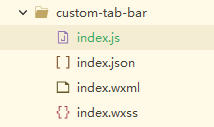
index.wxml
<!--miniprogram/custom-tab-bar/index.wxml-->
<cover-view class="tab-bar">
  <cover-view wx:for="{{list}}" wx:key="index" class="tab-bar-item" data-path="{{item.pagePath}}" data-index="{{index}}" bindtap="switchTab">
    <cover-image class="tab-bar-icon" src="{{selected === index ? item.selectedIconPath : item.iconPath}}"></cover-image>
    <cover-view class="tab-bar-active" style="display: {{selected === index ? 'block' : 'none'}}">
		<cover-image class="tab-image" src="../static/images/tab.png"></cover-image>
	</cover-view>
  </cover-view>
</cover-view>
index.wxss
.tab-bar {
  position: fixed;
  /* bottom: env(safe-area-inset-bottom); */
  bottom: 0;
  padding-bottom: env(safe-area-inset-bottom);
  width: 100%;
  height: 142rpx;
  background: #F2F2FA;
  /* background: transparent; */
  display: flex;
}
.tab-bar-item {
  flex: 1;
  text-align: center;
  display: flex;
  justify-content: center;
  align-items: center;
  flex-direction: column;
  position: relative;
}
.tab-bar-item .tab-bar-icon {
	width: 60rpx;
	height: 60rpx;
	margin-bottom: 27rpx;
}
.tab-bar-item .tab-bar-active{
	width: 148rpx;
	height: 36rpx;
	position: absolute;
	bottom: 0;
}
.tab-bar-item .tab-bar-active .tab-image{
	width: 148rpx;
	height: 36rpx;
}
index.json
{
  "component": true
}
index.js
Component({
	data: {
		selected: 0,
		color: '#0050FF',
		selectedColor: '#0050FF',
		list: [{
				pagePath: "/pages/home/home",
				iconPath: "/static/images/home.png",
				selectedIconPath: "/static/images/home_active.png",
				text: ""
			},{
				pagePath: "/pages/pointDistribution/pointDistribution",
				iconPath: "/static/images/map.png",
				selectedIconPath: "/static/images/map_active.png",
				text: ""
			},{
				pagePath: "/pages/mine/mine",
				iconPath: "/static/images/mine.png",
				selectedIconPath: "/static/images/mine_active.png",
				text: ""
			}]
	},
	attached(){

	},
	methods: {
	  switchTab(e) {
	    const data = e.currentTarget.dataset
	    const url = data.path
	    wx.switchTab({url})
		  this.setData({
		    selected: data.index
		  })
	  }
	}
})
自定义 tabbar中间按钮凸起
html
<view class="tabCon">
	<view class="tabItem" v-for="(item,index) in tabList" :key="index" @click="tabBtn(item.pagePath)">
		<view class="imgTab">
			<image v-if="current == index" :src="item.selectedIconPath" mode=""></image>
			<image v-else :src="item.iconPath" mode=""></image>
		</view>
		<view :class="current == index?'fontTab':'fontColor'">{{item.text}}</view>
	</view>
</view>
css
.fontColor{
		color:#C0C0C0!important;
	}
	.tabCon{
		width: 100%;
		height: 140rpx;
		position:fixed;
		bottom:0;
		background:#FFFFFF;
		display: flex;
		justify-content: space-between;
		align-items: center;
		box-shadow: 0px -4px 19px rgba(0, 119, 255, 0.12);
		font-family: 'PingFang Regular';
		font-size: 22rpx;
		.tabItem{
			width: 33.33%;
			height: 100%;
			display: flex;
			flex-flow: column;
			align-items: center;
			justify-content: center;
			position: relative;
			.imgTab{
				width: 40rpx;
				height: 42rpx;
				margin-bottom:8rpx;
				image{
					width: 100%;
					height: 100%;
				}
			}
			.fontTab{
				color: #333333;
			}
		}
		.tabItem:nth-child(2){
			width: 128rpx;
			height: 128rpx;
			border-radius: 50%;
			background-color: #4385F8;
			position: relative;
			top:-35rpx;
			transform-style: preserve-3d;
			::before{
				content: '';
				width: 138rpx;
				height: 138rpx;
				border-radius: 50%;
				background-color: #FFFFFF;
				box-shadow: 0px -4px 19px rgba(0, 119, 255, 0.03);
				position: absolute;
				top:-25rpx;
				left:50%;
				right: 50%;
				transform: translateX(-50%) translateZ(-10rpx);
			}
			.fontTab{
				color:#FFFFFF;
			}
		}
	}
js
export default{
		props:{
			current:String
		},
		data(){
			return{
				tabList:[
					{
						pagePath:"/pages/home/home",
						text:'首页',
						iconPath:"/static/images/zhoubao1.png",
						selectedIconPath:'/static/images/zhobao.png'
					},{
						pagePath:"/pages/writeWeekly/writeWeekly",
						text:'写',
						iconPath:"/static/images/add.png",
						selectedIconPath:'/static/images/add.png'
					},{
						pagePath:"/pages/personalCenter/personalCenter",
						text:'个人中心',
						iconPath:"/static/images/zhongxin.png",
						selectedIconPath:'/static/images/zhongxin1.png'
					}
				]
			}
		},
		methods:{
			tabBtn(pagePath){
				// console.log(pagePath)
				uni.switchTab({
					url:pagePath
				})
			}
		}
	}
其他页面引入
<tab :current="0"></tab>