效果图
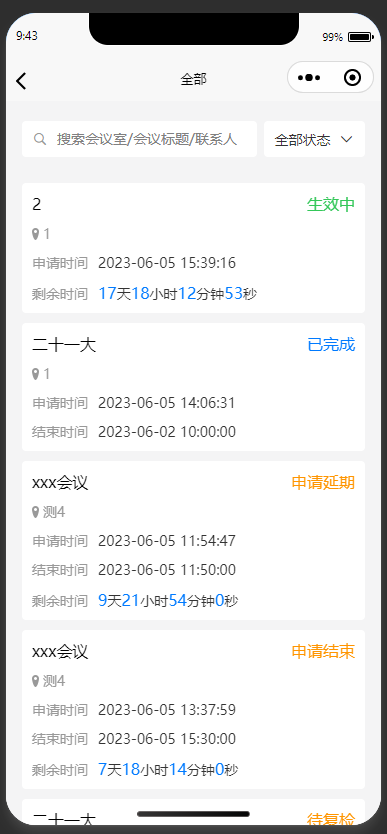
封装的方法
handleTime  (timestamp) {
	let t = Math.abs(timestamp);
	let d = Math.floor(t/100/60/60/24);
	let h = Math.floor(t/1000/60/60%24);
	let m = Math.floor(t/1000/60%60);
	let s = Math.floor(t/1000%60);
	return{
		day: d,
		hours: h,
		minute: m,
		second: s
	}
},
getRemainTime (overTime) {
	let now = new Date().getTime();
	let over = new Date(overTime).getTime();
	return this.handleTime(over - now);
},
调用方法
<template>
   <view>
   	  <view v-for="(item, index) in times" :key="index">{{ item.remainTimeNum }}</view>
   </view>
</template>

import { getRemainTime } from @/utils/utils.js';

export default {
   data() {
   	return {
   		times: [{
            id: 1,
            applyStart:  "2023-06-03 08:00:42",
            applyEnd:  "2023-06-03 09:00:07",
            name:  "2"
            note:  "1",
            phone:  "1",
            placeName:  "1",
         }{
            id: 2,
            applyStart:  "2023-06-03 10:00:30",
            applyEnd:  "2023-06-03 12:00:00",
            name:  "2"
            note:  "1",
            phone:  "1",
            placeName:  "1",
         }]
   	};
   },
   onLoad() {
   		this.timer(this.times);
   },
   methods: {
   		timer(times) {
   			let that = this;
			let timeInterval = null
			clearInterval(timeInterval)
			timeInterval = setInterval(() => {
				times.forEach((item, index) => {
					that.$set(item, 'remainTimeNum', getRemainTime(item.applyEnd))
				})
			},1000)
   		}
   }
};
</script>
在页面渲染完成之后,对data里的某个数组或对象进行新增、删除属性是监听不到的,视图不会更新,需要使用this.$set()更新视图。
this.$set(target, key, value)
target: 要更改的数据源(可以是一个对象或者数组)
key: 要更改的属性(字段)
value: 新增的值
删除属性可以使用
this.$delete(target,key)