第一步
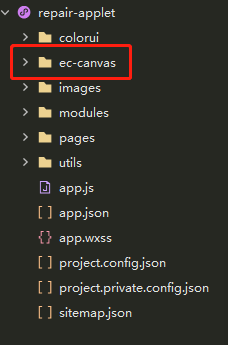
第二步
index.json
{
	// "component": true,
	"usingComponents": {
		"ec-canvas": "../ec-canvas/ec-canvas"
	}
}
第三步
index.wxml
<ec-canvas id="mychart-dom-line" canvas-id="mychart-line" ec="{{ec}}"></ec-canvas>
第四步
index.js
import * as echarts from '../../../ec-canvas/echarts';

Page({
	data(){
		ec:{
			lazyLoad: true // 延迟加载
		},
	},
	onload(){
		//初始化渲染折线图
		this.barComponent = this.selectComponent("#mychart-dom-line");
		this.init_bar();
	},

	// 初始化折线图
	init_bar() {
		this.barComponent.init((canvas, width, height) => {
		  // 初始化图表
		  const barChart = echarts.init(canvas, null, {
			width: width,
			height: height
		  });
		  barChart.setOption(this.getBarOption());
		  // 注意这里一定要返回 chart 实例,否则会影响事件处理等
		  return barChart;
		});
	},

	// 折线图 option
	getBarOption(){
		return {
			color:['#0E9CFF','#FF7723','#D17CC2','#63A8F4','#75B31D','#5767F9','#63E7B7','#F07685',],
			legend: {
				icon:'rect',
				itemWidth:12,
				itemHeight:12,
				itemGap:10,
				data: ['Email','Union Ads','Video Ads','Video Ads2','Video Ads3']
			},
			xAxis: {
				type:'category',
				boundaryGap: false,
				data: ['衬衣','棉服','裙子','裤子']
			},
			yAxis: {
				type:'value'
			},
			series: [
			  {
				name: 'Email',
				type: 'line',
				data: [5, 20, 36, 10, 10, 20]
			  },{
				name: 'Union Ads',
				type: 'line',
				data: [220, 182, 191, 234, 290, 330, 310]
			  },{
				name: 'Video Ads',
				type: 'line',
				data:  [120, 132, 101, 134, 90, 230, 210]
			  },{
				name: 'Video Ads2',
				type: 'line',
				data:  [120, 132, 101, 134, 90, 230, 210]
			  },,{
				name: 'Video Ads3',
				type: 'line',
				data:  [120, 132, 101, 134, 90, 230, 210]
			  }
			]
		 };
	},
})
使用蒙层或者自定义tabbar,ucharts层级过高
因为canvas在微信小程序中是原生组件,如果使用弹窗,图表则会超出预期,此时需要给组件的canvas2d传值true来使用type='2d'的功能,开启此模式后,一定要在组件上自定义canvasId,不能为数字,不能动态绑定,只能为字符串
<qiun-data-charts :canvas2d='true' canvasId='canvans7' type="scatter" :chartData="chartData" />
注意:canvas2d设置为true;canvasId必须唯一